
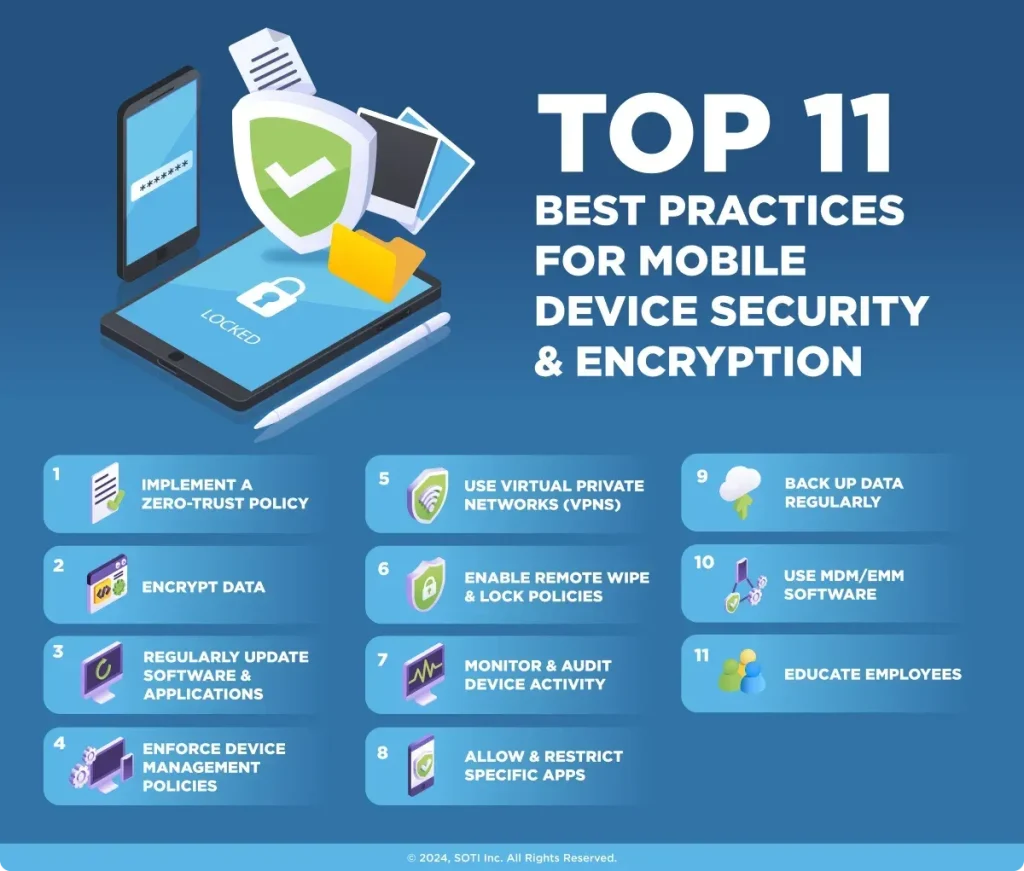
In today’s hyper-connected world, mobile security best practices are essential for safeguarding your digital life, protecting personal information, work data, and everyday communications across devices you rely on. A thoughtful approach blends device hygiene, smart app habits, secure networks, and proactive monitoring to protect mobile data, ensuring that sensitive files, passwords, and conversations stay private even when you are on the move. This strategy emphasizes responsible app permissions, regular software updates, secure configurations, and mindful behavior to reduce exposure to threats stemming from phishing, data leakage, or untrusted networks. The guidance is practical and easy to adopt, offering step-by-step actions you can implement today, such as enabling automatic updates, reviewing app access, and choosing trusted networks whenever possible. By combining a robust hygiene routine with disciplined usage patterns, you lower risk while preserving a smooth, productive mobile experience that supports both personal and professional life and helps you stay aligned with security goals.
Beyond traditional advice, the same ideas can be framed as protecting smartphone data, strengthening device privacy, and securing the digital footprint on handheld tech. This broader view emphasizes practical controls, from locking screens and updating software to choosing trusted networks and mindful app usage. In this lens, the goal is to minimize risk through layered defenses, clear data governance, and proactive monitoring of unusual activity on every connected device. By thinking in terms of device resilience and data integrity, users can navigate a complex threat landscape with confidence.
Mobile Security Best Practices: Protect Mobile Data and Secure Mobile Devices in Everyday Life
Adopting mobile security best practices begins with the basics of device hygiene: lock the screen with a strong passcode, enable biometrics where available, and set automatic screen locking. This foundational step protects mobile device security by preventing casual access and reducing the attack surface, directly supporting the goal to protect mobile data from unauthorized use.
Keep your system and apps up to date by enabling automatic OS and security updates. Regular updates close known vulnerabilities that attackers often exploit, and they reinforce your mobile device security and overall resilience in a threat landscape that evolves rapidly. Combine this with enabling built‑in encryption and configuring cloud backups to ensure data remains protected both at rest and in transit.
Additionally, practice privacy controls and device-based protection such as remote wipe for lost devices and controlled app permissions. By separating personal and corporate data where appropriate and using enterprise-grade management where needed, you strengthen mobile data protection and secure mobile devices across contexts.
Practical Mobile Security Tips: Safeguard Apps, Networks, and Identities with a User-Centric Approach
As part of ongoing mobile security tips, choose apps carefully: download only from trusted stores, review requested permissions, and grant only the minimum access required. This approach enhances mobile app security and reduces the risk of data leakage, helping you protect mobile data and maintain privacy.
Ensure network hygiene by avoiding unfamiliar public Wi‑Fi or using a reputable VPN to encrypt traffic. Turn on features like Always Use VPN if available and disable auto-connect to unknown networks; keep Bluetooth off when not in use. These practices reinforce secure mobile devices operation in daily life and are core elements of mobile device security.
Enhance authentication with multi‑factor authentication, biometrics, and hardware security keys where possible. Use strong passwords, keep recovery options current, and apply end‑to‑end encryption for sensitive communications. Together, these measures form a practical layer of mobile security tips that protects accounts and sensitive data in motion and at rest.
Frequently Asked Questions
What are essential mobile security tips to protect mobile data on everyday devices?
Key mobile security tips to protect mobile data include setting a strong passcode or biometric unlock and enabling automatic screen lock, keeping the OS and apps updated, and only installing apps from trusted sources. Also enable device encryption, regular backups, and remote wipe where available. Use a reputable VPN on public networks, review app permissions, and enable multi-factor authentication for critical accounts. These steps reinforce mobile app security and overall mobile device security while reducing data exposure.
How can organizations implement secure mobile devices and mobile device security best practices for BYOD programs?
Organizations can strengthen mobile device security by applying a comprehensive BYOD policy and using mobile device management (MDM) to enforce security standards and secure mobile devices. Key steps include requiring encryption, enabling remote wipe, enforcing MFA for critical accounts, and ensuring devices receive timely OS and app updates. Enforce secure networks with VPN, limit data sharing across apps, and implement strong app controls and mobile app security measures such as app protection policies. Finally, educate users, segregate personal and corporate data, and conduct regular incident response drills to boost overall mobile security.
| Topic | Key Points | Practical Tips |
|---|---|---|
| Threat landscape & importance | Mobile threats have evolved beyond simple viruses. Attacks come via legitimate-looking apps, phishing, and insecure networks, exploiting weak configurations and outdated software. A lifecycle approach (setup to maintenance) is essential to reduce risk. | – Adopt a lifecycle mindset from device setup through ongoing maintenance. – Prioritize encryption, updates, and security-aware behavior. – Use a network-aware posture (VPN, trusted networks). |
| 1) Build rock-solid device hygiene routine | Foundation security: lock the device, use a strong passcode, biometrics, auto-lock; keep software updated. | – Enable auto-updates for OS and apps. – Use a long, unique passcode; enable biometrics where practical. – Ensure auto-lock is enabled and reasonably quick. |
| 2) Prioritize secure app behavior & permissions | Install apps from trusted sources and review requested permissions; grant minimum access; audit apps; consider enterprise protections for business. | – Review per-app permissions; revoke unused access. – Remove unfamiliar or unused apps. – For business contexts, apply MDM/app protection as needed. |
| 3) Strengthen data protection through encryption & backups | Encrypt data at rest and in transit; enable full-disk encryption where applicable; encrypted cloud backups; remote wipe capability; privacy settings. | – Enable backups with encryption; verify recovery. – Use encrypted cloud storage and remote wipe for lost devices. – Limit data sharing and store credentials securely. |
| 4) Secure networks & connectivity | Public Wi‑Fi risks data confidentiality; use trusted networks or a reputable VPN; consider Always-on VPN; be cautious with Bluetooth. | – Avoid unknown networks; enable Always-on VPN where possible. – Disable Bluetooth when not in use; avoid pairing with unfamiliar devices. |
| 5) Strengthen authentication & access control | Use MFA wherever possible; combine strong passwords with biometrics; consider hardware security keys for critical accounts; keep recovery options up to date. | – Enable MFA and biometrics; use hardware keys for high-stakes accounts. – Regularly review and update recovery options. |
| 6) Protect sensitive communication & data in motion | Prefer apps/services with end-to-end encryption for messages/files; avoid insecure channels; secure file storage with strict permissions and logs. | – Use E2EE apps for sensitive conversations. – Store sensitive files with strong permissions and activity logs. |
| 7) Privacy, permissions & corporate considerations | Review app privacy policies; limit data collection and location tracking; for organizations, deploy BYOD policies and MDM; separate personal vs corporate profiles. | – Limit location sharing; apply MDM/clear separation of profiles. – Regularly audit privacy settings across apps. |
| 8) Incident readiness & response | Have an incident response plan for lost/stolen devices or suspected compromise; include remote lock/wipe, credential revocation, and notification steps; practice tabletop exercises. | – Define procedures for rapid containment and notification. – Conduct periodic drills and update plans based on lessons learned. |
| 9) Practical daily checklist | A concise daily routine to maintain baseline security. | – Use a strong, unique passcode; enable biometrics. – Keep OS/apps updated; review permissions; enable trusted VPN. – Encrypt device storage; enable remote wipe; use MFA. – Limit data sharing; monitor privacy settings; back up data. – Stay vigilant against phishing and social engineering. |
| Tools, resources & ongoing learning | Leverage built-in security features, trusted security apps, and ongoing learning resources. | – Follow vendor advisories; consult security blogs; participate in ongoing training and phishing simulations. |
Summary
Conclusion